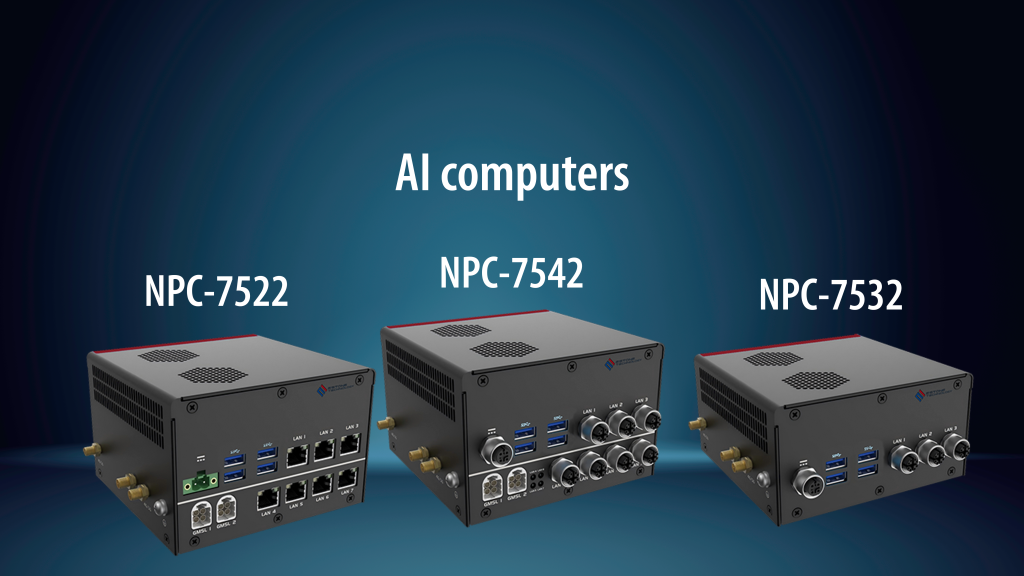
AI Computer for Manufacturing Automation: Bringing Real-Time Intelligence to the Factory Edge
August 13, 2026 by
admin
An AI computer is not simply a faster industrial PC. In manufacturing automation, it is a local edge computing system designed to process camera images, sensor data, production signals and machine events close to the equipment. Instead of sending every image or data point to the cloud, the AI computer performs inference on-site, helping factories make faster decisions for inspection, sorting, defect detection, safety monitoring and predictive maintenance.
For manufacturers, machine builders and automation integrators, the real value is not only AI performance. The device also needs industrial reliability, stable I/O, long lifecycle availability, wide-voltage power input, thermal control and easy integration with existing PLC, SCADA, MES and vision systems. This is why choosing the right AI computer should start from the application, not from the processor specification alone.
Where an AI Computer Fits in a Smart Factory Architecture
In a typical smart factory, data moves through several layers. Sensors, cameras and PLCs collect real-time production information. HMIs, industrial PCs and controllers manage machine operation. MES and ERP systems handle production planning, traceability and business data. The AI computer usually sits close to the machine, production line or inspection station, where low latency and local decision-making matter most.
For example, a vision camera may capture images of packaged goods, metal parts, labels, welds, electronic components or logistics parcels. A cloud server could analyze these images, but network delay, bandwidth cost and data security concerns may create problems. A local edge AI computer can run inference directly beside the machine, send only results to the upper system and keep production moving even when the network is unstable.
edge AI computer
High-Value Applications for AI Computers in Manufacturing
AI computers are most useful when a factory needs faster recognition, more consistent inspection or better prediction than traditional rule-based automation can provide. The following applications are especially suitable for industrial environments.
Machine Vision Defect Detection
Traditional machine vision often depends on fixed lighting, fixed position and rule-based image processing. This works well for simple measurements, but it can struggle with scratches, contamination, color variations, irregular shapes and surface defects. An industrial AI computer can run trained vision models locally to identify defects that are difficult to define with traditional rules.
Detecting surface scratches, dents, cracks or stains
Checking label position, print quality and barcode readability
Inspecting weld seams, molded parts, machined parts or assembled components
Classifying acceptable and unacceptable product variations
Predictive Maintenance and Anomaly Detection
Many production problems do not happen suddenly. Motors, pumps, conveyors, fans and robotic systems often show early signs through vibration, temperature, sound, current or cycle-time changes. An AI computer can analyze these signals locally and identify abnormal patterns before equipment failure causes unplanned downtime.
This is especially helpful when factories want to move from scheduled maintenance to condition-based maintenance. Instead of replacing parts too early or waiting for breakdowns, the system can flag machines that need attention based on real operating behavior.
Robotics and Automated Material Handling
Robots, AMRs, AGVs and automated warehouse systems often need real-time perception. They may need to identify objects, avoid obstacles, read pallet positions, recognize package orientation or coordinate with conveyor systems. An AI computer can support these tasks by combining camera input, sensor data and AI inference at the edge.
For logistics and warehouse automation projects, AI computing can also support parcel recognition, dimension detection, intelligent sorting and forklift safety monitoring. These use cases usually require stable connectivity, rugged design and integration with warehouse management systems.
Process Monitoring and Quality Traceability
AI computers can also work as intelligent edge nodes for process monitoring. They can collect production signals, analyze them locally and send structured results to MES, SCADA or cloud dashboards. This makes them useful for factories that need traceability but do not want to overload upper-level systems with raw image or sensor data.
AI Computer vs Industrial PC: What Is the Real Difference?
An industrial PC is designed for reliable computing in harsh environments. It may control machines, run HMI software, collect data or connect with automation systems. An AI computer is usually a more specialized edge device that adds AI acceleration, high-speed data processing and model inference for applications such as vision inspection and autonomous decision-making.
Selection Factor
Industrial PC
AI Computer
Main Role
Control, HMI, data acquisition, gateway tasks
Real-time AI inference, machine vision, sensor fusion
Typical Workload
SCADA, MES terminal, PLC communication, industrial software
AI acceleration, GPU/NPU capability, camera and sensor throughput
Best Location
Control cabinet, panel, workstation, machine-side terminal
Near cameras, robots, inspection stations or edge data sources
Key Buying Question
Can it run my automation software reliably?
Can it run my AI model fast and reliably at the edge?
How to Choose the Right AI Computer for an Automation Project
The best AI computer depends on the workload, environment and integration requirements. Before comparing models, buyers should define what the system must actually do in the field.
1. Start with the AI Workload
A simple detection model for one camera does not require the same computing power as multi-camera 3D inspection or robotics perception. Confirm how many cameras or sensors will be connected, what image resolution is required, how many frames per second need to be processed and whether the AI model must run continuously.
2. Check Camera and I/O Requirements
AI vision systems may require USB, Ethernet, PoE, GMSL, serial communication, CAN, digital I/O or expansion interfaces. For machine builders, I/O planning is just as important as processor selection because the AI computer must fit into the existing automation architecture.
3. Evaluate Industrial Reliability
Factories can expose computers to heat, dust, vibration, unstable power and 24/7 workloads. A suitable industrial control and automation device should support stable operation in the intended environment, especially when it is installed inside a cabinet, near a conveyor, on a robot platform or beside inspection equipment.
4. Consider Software and Lifecycle Support
AI projects are not finished when hardware is installed. Models may be updated, camera settings may change, and the customer may need long-term support for operating systems, drivers, SDKs and deployment environments. For OEM projects, lifecycle stability is often more important than using the newest hardware platform for every generation.
Common Mistakes When Buying an AI Computer
Many AI automation projects fail not because AI is ineffective, but because the hardware was selected too late or based only on peak performance numbers. These are common mistakes to avoid.
Choosing by TOPS alone: AI performance matters, but I/O, thermals, storage, memory and software compatibility also determine real field performance.
Ignoring camera bandwidth: Multi-camera systems can quickly exceed available interface capacity if bandwidth is not planned early.
Using office-grade PCs near machines: Consumer or office computers may fail under vibration, dust, heat or unstable power.
Sending too much raw data to the cloud: Local inference can reduce latency, bandwidth usage and data exposure.
Forgetting maintenance access: The device should be easy to mount, service, update and monitor after deployment.
Example Deployment: AI Vision Inspection on a Production Line
Consider a packaging line where products move quickly through filling, sealing, labeling and carton packing. Cameras can inspect label alignment, printed codes, seal quality and package presence. The AI computer receives images from the camera system, runs trained inspection models and sends pass/fail results to the PLC or line controller.
If a defect is detected, the system can trigger rejection equipment, stop the line or send quality data to the MES. This setup reduces manual inspection pressure and helps maintain more consistent quality across shifts. Because inference happens locally, the decision can be made within the production cycle instead of waiting for remote processing.
When Should You Use an AI Computer Instead of a Standard Industrial PC?
A standard industrial PC may be enough if the task is HMI operation, data logging, PLC communication or simple rule-based vision. An AI computer becomes more appropriate when the project needs real-time recognition, model inference, multi-camera analysis, autonomous decision support or advanced edge processing.
In practical terms, manufacturers should consider an AI computer when inspection accuracy, response time or local intelligence directly affects production efficiency, safety or quality control. For machine builders and system integrators, it can also become a differentiating feature in next-generation automation equipment.
FAQ About AI Computers in Manufacturing Automation
What is an AI computer in industrial automation?
An AI computer is an edge computing device that runs AI inference near machines, cameras or sensors. It is used for tasks such as machine vision, defect detection, robotics perception, predictive maintenance and process monitoring.
Is an AI computer the same as an industrial PC?
No. An industrial PC focuses on reliable computing for automation environments, while an AI computer adds AI acceleration and edge inference capability. In some projects, an AI computer can also function as an industrial PC, but its main advantage is local AI processing.
Why use edge AI instead of cloud AI in a factory?
Edge AI reduces latency, lowers bandwidth demand and keeps sensitive production data closer to the factory. It is especially useful when decisions must be made immediately, such as rejecting defective parts or guiding robots.
What should machine builders check before choosing an AI computer?
Machine builders should check AI workload, camera interfaces, I/O requirements, operating temperature, power input, mounting method, software environment and lifecycle support.
Can AI computers be used in warehouse logistics?
Yes. AI computers can support parcel recognition, intelligent sorting, pallet detection, forklift safety systems, warehouse vision systems and automated material handling equipment.
What is the best application for an AI computer?
The best applications are those where real-time recognition or prediction improves production results. Common examples include machine vision inspection, anomaly detection, robotics, safety monitoring and predictive maintenance.
Conclusion
AI computers help manufacturers bring intelligence closer to machines, cameras and production data. For automation integrators and OEMs, the right system can reduce cloud dependence, improve response time and support smarter factory workflows. The key is to choose based on the actual use case: inspection workload, I/O requirements, environment, software stack and long-term deployment needs.
For projects involving machine vision, robotics, predictive maintenance or intelligent warehouse automation, an industrial-grade AI computer can become the bridge between conventional automation and real-time edge intelligence.
Contact For Personal Quote
Stay updated with Estone's latest product solution and technology. Subscribe to our Newsletter. Mail us: info@estonetech.eu